Archive for Alternatives

Quantum GIS Open Source Alternative To ArcGIS

ArcGIS is a popular GIS - A geographic information system (GIS) that integrates hardware, software, and all forms of geographically referenced information. ArcGIS allows us to view, understand, question, interpret, and visualize data in many ways that reveal relationships, patterns, and trends in the form of maps, globes, reports, and charts. GIS is the merging of cartography, statistical analysis and database technology. GIS can be used in geographical, archaeological or land surveying studies. There are many uses of a GIS. ArcGIS is popular and as usual comes with a price.


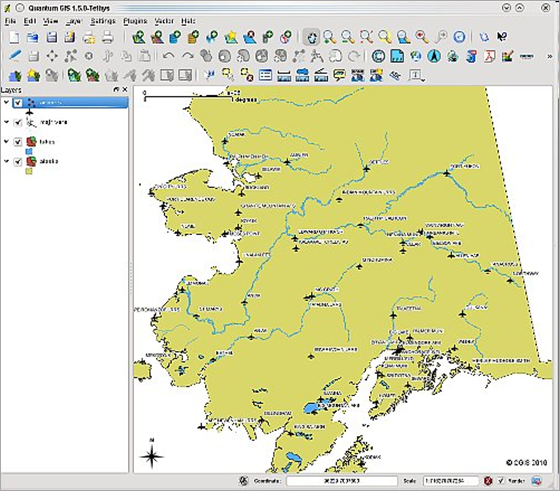
If you are looking for a free and open source solution which is similar to ArcGIS, then there is an option – Quantum GIS. Quantum GIS (QGIS) is a user friendly Open Source Geographic Information System (GIS) that runs on Linux, Unix, Mac OSX, and Windows. QGIS supports vector, raster, and database formats. QGIS is licensed under the GNU Public License.


image

Core features of QGIS:

  • Raster and vector support
  • Support for nonspatial tables
  • GRASS  Integration
  • Extensible plugin architecture
  • Digitizing tools
  • Print composer
  • Python language bindings
  • OGC support (WMS, WFS)
  • Overview panel
  • Spatial bookmarks
  • Identify/Select features
  • Edit/View attributes
  • Feature labeling
  • On the fly projection

Open Source Source Insight Alternatives

Source Insight is one of the popular commercial Code Browsers and Analyzers for for C/C++, C#, and Java. So is Understand another commercial tool. They are good but not cheap. If you are free tools guy or a small time developer who can not afford such tools, there are some alternatives. Of course, improvements are required for these free tools but they are good enough to start with.

Code Blocks

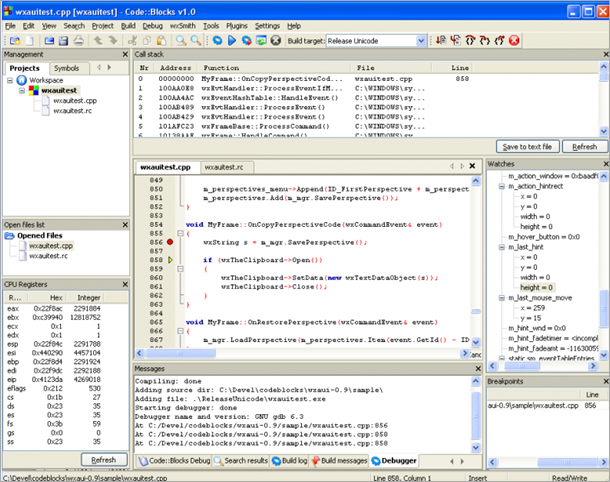
Code::Blocks is a free C++ IDE built to meet the most demanding needs of its users. It is designed to be very extensible and fully configurable. Built around a plugin framework, Code::Blocks can be extended with plugins. Any kind of functionality can be added by installing/coding a plugin. Compiling and debugging functionality is already provided by plugins!

Disadvantage is it supports just C++. More is here.

image

Source-Navigator

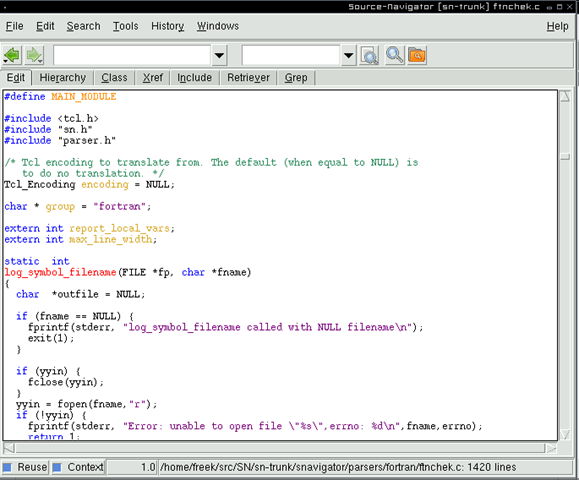
Source-Navigator is a source code analysis tool. With it, you can edit your source code, display relationships between classes and functions and members, and display call trees. Check it out.

image

Some more resources (via Stack overflow)

12 Free Alternatives To MagicDraw UML, Free Alternatives To Enterprise Architect

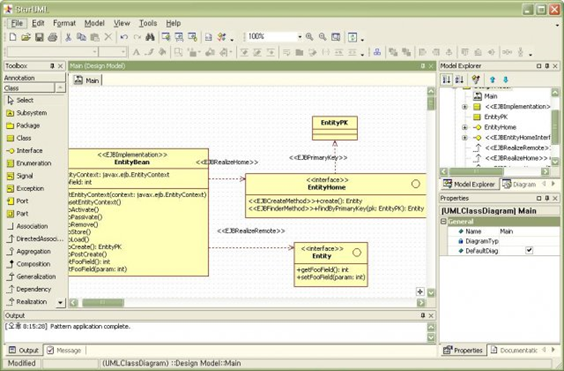
UML Drawing tools are essential for any software designer. Tools such as MagicDraw, Visio or Enterprise Architect are great but comes with a price tag. If you looking for a good free tool to do your UML models, we recommend that you consider the following list of Free UML Modellers. There are about 12 such free UML tools such as StarUML, ArgoUML, BOUML etc.


12 Great Free and Open Source UML Modelling Tools


image

12 Great Free and Open Source UML Modelling Tools

Next Generation Web Search Engine – Search and Sort As Per Tags!

Search Engine market is dominated by Google and Bing (from Microsoft) search engines. Others almost out of the market or just hanging on to the bottom! Both of them are really doing well and adding features for us to search better each day. But, world is full of intelligent people and how do you keep up to the young talents coming up with new ideas and technologies.

image

Take a look at this new Search engine – Blekko! Really impressive. Need to see how they scale up.

What is Blekko anyways?

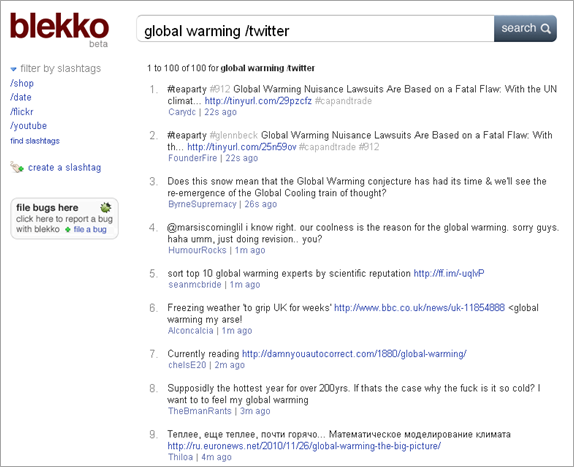
Blekko is a search engine with a difference. They have introduced “Slashtags”. Using slash tags, you could sort your search results based on criteria. Say, you search for technology news and use tag /date, you will get search results chronologically sorted results. something which is not easy to do on Google/Bing search. Lots of tags are out there to slash internet. You can use default tags or introduce your own tags. You can make them private or public. Others can use your tags if you wish to.

e.g. below is a search query on Global Warming with slashtag /Twitter. It gives the Twitter results for global warming!

image

Best Fault Tree Analysis software to analyze complex systems

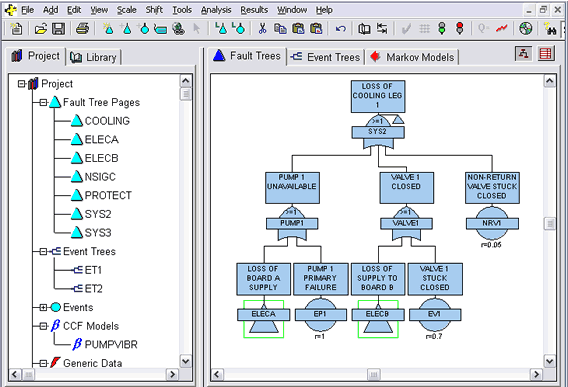
While Root Cause Analysis is a set of problem solving methods that is aimed at identifying the root cause of an incident, Fault Tree Analysis is one of the popular techniques that is used in the field of safety engineering to quantitatively determine the probability of a safety hazard. FTA is a deductive, top-down method aimed at analyzing the effects of initiating faults and events on a complex system. There are many software that help you in the Fault Tree Analysis. Some of them are quite expensive but worth every penny.Here in this post we look at some popular Fault Tree Analysis software that are available.
fault-tree-analysis-software

Recommended Reading:

Open Source Software

1. OpenFTA

auvation_tiny

OpenFTA is open source product for conducting a formal Fault Tree Analysis. Its an advanced tool for fault tree analysis. It has an intuitive front-end which allows the user to construct, modify or analyse fault trees. OpenFTA has been designed to gain wide international acceptance for fault tree analysis, particularly in the aerospace, nuclear, medical equipment and defense fields

More info here.

Commercial Software

2. Relex Fault Tree

Relex-Tag

In applications where reliability and safety are paramount, it is necessary to identify all factors contributing to critical safety issues and failures in a product or system. Relex Fault Tree helps you construct a graphical representation of the critical issue and its contributing events. It provides the analysis tools required to help mitigate its occurrence or impact. The powerful analytical capabilities of Relex Fault Tree quantify system risk and reliability, helps you make targeted decisions about design, maintenance, and controls to reduce the probability of failure.

More info here.

3. ITEM ToolKit

Item

ITEM ToolKit’s Fault Tree Software offers a diverse graphical user interface (GUI) flexible, powerful and easy ways for constructing Fault Trees. The GUI consists of menus, toolbars, and project and system windows. You can simply add different gates and events in the System Window to create a hierarchy of your system, ITEM ToolKit will construct the Fault Tree Diagram for you. You can also build your Fault Tree the traditional way by adding gates and events in the Diagram Window.

More info here.

4. FaultTree+

isograph1

FaultTree+ is the world’s most popular fault tree software package incorporating fault tree analysis, event tree analysis and Markov analysis. FaultTree+ has three different modules. The Fault Tree Analysis module allows you to construct and analyze fault tree diagrams. The Event Tree Analysis allow you to analyze the possible outcomes of an event occurring. And the Markov Analysis enables  the construction of Markov models for components with large interdependencies.

More info here.

Related Posts with Thumbnails