Archive for How-tos

How To Setup Your Own Distributed Workplace And Work On Your Dream Product?

There are many young techies out there with some of the greatest ideas and most of them are reluctant to leave their jobs and get their hands dirty with their dream product/idea. If imageyou quit your day job then its like losing your monthly income, insurance coverage and what not. Convincing your spouse is not easy too. So how do we go on setting up our own distributed work force and get your work down at the same time by doing your day job? Well, Web 2.0 has given rise to this amazing community concept. There is literally a community for almost anything. So why not for those who are looking out for part time or full time work online. They may be spread across the world but with the web conferencing tools, it is not very difficult to have daily sync-up meetings from your comfort of home or where ever it is comfortable. So, where to look for professionals for your virtual office? You could probably look at the following few options. These services are not really free but mostly they are good and will protect you from any misbehavior from either job seeker or employer.

TwitJobSearch

A Job search engine for Twitter! Isn’t that cool? You don’t have to follow too many trends like #jobs etc. The Search engine gets the formatted results from Twitter and you have a wide range of categories to choose from. Though a simple idea, it makes a lot of sense if you know whom you are searching for! Check out here.

image

Elance

Elance has been around for many years now, one of the best place for finding Open Source enthusiasts to power your idea! Check out here.

image

FindATechJob

Findatechjobis a metasearch job engine that searches multiple career sites with a focus on computer jobs, internet jobs and networking jobs. Freelance jobs are also included in our search for those searching for contract work. Read here.

oDesk

Post your requirements, find the right professionals and work as if you are all part of small office! So exciting for anyone who is eager to work on their project! Check out oDesk.

image

RentACoder

Need custom software? Receive bids from our pool of 290,694 registered workers.! RentACoder too can get you the people you are looking for! Check out RentACoder.

image

Have you tried searching for people? There are so many ways for payment options…you can pay hourly or fixed price. Get the update and progress on a regular basis. Software development will fun if used properly. Have you used such service? If so, please comment!
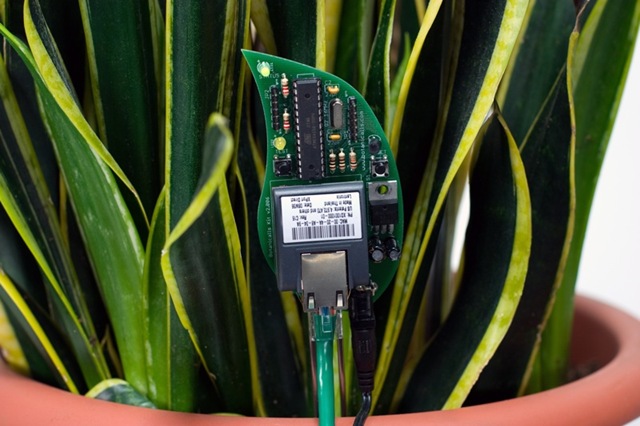

Plants Can Tweet Too!

Who said that plants can’t tweet! If there is someone who has said so, then take a look at the botanicalls. They proved them wrong!

Botanicalls has opened a new channel of communication between plants and humans, in an effort to promote successful inter-species understanding. its aimed at establishing communication between plants and humans. It provides the ability to plants to call and text message people to request assistance.

Botanicalls Kits offer a connection to your plants via online Twitter status updates to your mobile phone. When your plant needs water, it will post to let you know, and send its thanks when you show it love.

Recommended Reading:

tweeting_plants

For more information on learning how to assemble your Botanicalls Kit and enable plants to tweet, get started here. Its simple and easy.

BlogBooker - Export Your Blog To PDF, Print Your Blog, Convert Your Blog To PDF In Seconds!

Do you want to have a PDF backup of your blog? Then try BlogBooker! Its amazingly simple and within a few clicks, you can export your blog in to a nice PDF book! It supports WordPress, Blogger and LiveJournal based blogs. All it needs is Blogs XML export and the URL of the your Blog.

image

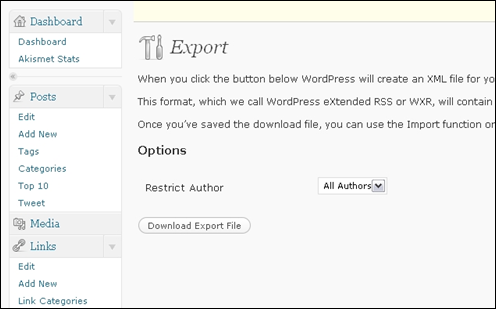
Getting XML export of your blog is really simple. If you have a WordPress (Self hosted) blog, just login to Admin dashboard, go to Tools->Export option. You can easily dump XML export of your blog.

image

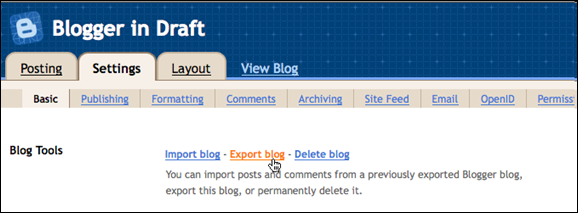
Same is the case if you have a Blogger based blog, Settings->Basic->Blog Tools->Export Blog and for LiveJournal blog users, provide the username and password. BlogBooker can generate high quality PDF within seconds/minutes depending on your blog content size.

image

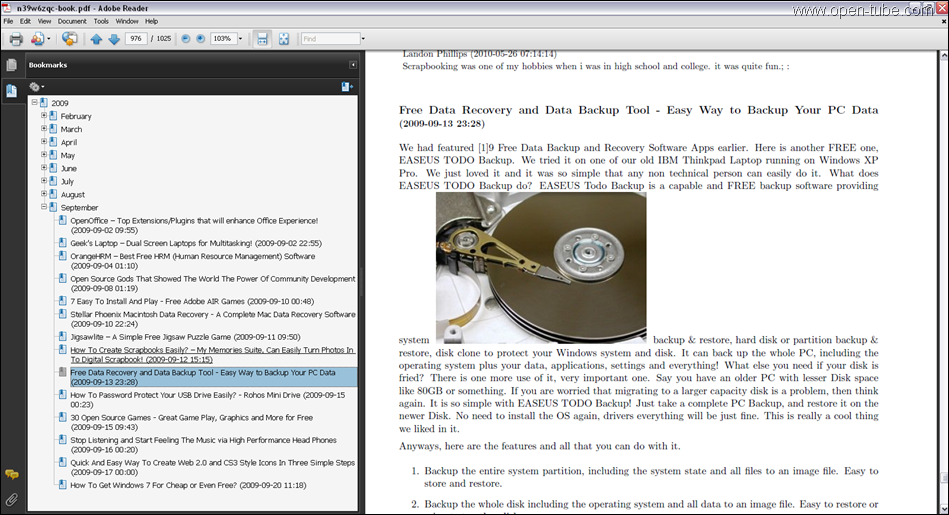
Once the Blog XML export file and the URL are given, BlogBooker gets in to action. It quickly converts the blog posts, comments etc in to a well formatted PDF file with header/footer and Table of Contents for you to download. You can print it out or save or send it to your friends. Here is a sample PDF screenshot of Open-Tube!

open-tube.com

Five Free Resources To Identify Songs Easily

Most of the time we tune into the radio and listen only to part of the song not knowing who it is by. We keep humming the song and wish we could listen to it again without knowing who sung it. We wish we had a service that can identify the song that is locked in your head.

Recommended Reading:

To help you out of such musical dilemma we have identified a list of handy resources that will identify the song for you for free.

1. LyricRat

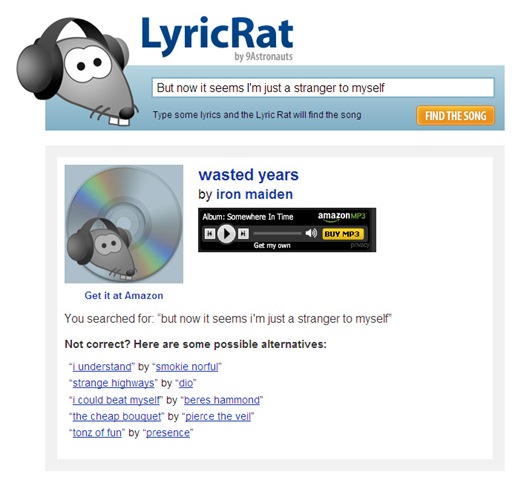
Lyric Rat is naming that tune in 140 characters or less. When tried to search for “But now it seems I’m just a stranger to myself” it took 3 seconds and came up with the result “Wasted Years by Iron Maiden”.It also lists some alternatives. You can make sure by listening to a shot clip of the song online to confirm its the same tune you were looking for. To buy the album, just click on the title or artist that would take you to amazon where you can directly buy.

Lyrics

More info here.

2. Tunatic

Tunatic is free downloadable software for PCs and Macs. Its not a web-based service like the other ones but it does need an Internet connection to access the database to find the track. When you let Tunatic hear the song, you will get the artist’s name and the song’s title within seconds. Tunatic is the very first song search engine based on sound for your computer. All you need is a microphone and Internet access.

button-tunatic-active

More info here.

3. Midomi

Midomi offers the ultimate music search by offering a service that is just perfect for those tune-stuck-in-your-head moments. You can sing into the microphone and even hum. It efficiently manages to isolate the tracks you  were attempting to sing. Its a perfect service where you do not know the exact lyrics by can hum the song.

Midomi

More info here.

4. Musipedia

Musipedia uses the "Melodyhound" melody search engine. You can find and identify a tune even if the melody is all you know. You can play it on a piano keyboard, whistle it to the computer, simply tap the rhythm on the computer keyboard or use the Parsons code.

musicpedia

More info here.

5. Name My Tune

Name My Tune is another neat service that lets you sing or hum a tune into the microphone and you will get an email when the song gets identified. who identifies the songs? well the songs are identified by the visitors.

name-my-tune

More info here.

5 Easy To Use Software To Generate Barcode Easily

A barcode is an optical machine-readable representation of data, which shows certain data of products. For today’s supply chain compatibility requirement, printing high-quality barcode labels in an efficient manner for manufactured goods are increasingly important. It helps in making your valued product stands out in a crowd. Whether it is supply-chain packaging requirement or medical & pharmaceutical requirement or a factory inventory control, you need to have good barcode generators that are Easy-to-use to generate one dimension or two dimension barcodes. Here in this post we have presented 5 barcode generator software that help in complying to the supply chain requirement

barcode

Recommended Reading:

1. iBarcoder

With iBaroder you can create up to 20 types of bar codes and it  allows you to produce bar code labels in moments. It includes more then 800 Avery labels, cards, and other media type templates that lets you add the descriptive text and graphics to finish your label and print.

More info here.

2. BarCodLabgen

BarCodLabgen is a labeling and bar coding software that supports several languages. Using the software you can print labels that can have up to 3 barcodes, 10 text lines, 5 fixed text lines. These labels can be fully defined by the user and are printed from data in the database of the software.

More info here.

3. 2P Label Creator

2P Barcode Creator is a powerful yet very easy-to-use barcode creator program which you can trust to meet your barcode everyday needs anywhere your business leads to. It supports most 1D/2D barcode types and supports Postscript.

More info here.

4. Morovia Barcode ActiveX Professional

Morovia Barcode ActiveX is an extremely powerful ActiveX control for creating high quality barcode images. It can be used in any ActiveX-compliant environment such as Microsoft Excel, Word, Visual Basic, Visual C++, Delphi, C++ Builder and Visual Studio .Net

More info here.

5. PDF417 Barcode Generator

PDF417 Barcode Generator lets you easily create and print professional quality barcode images. You specify the value to encode, barcode size (or X-Dimension and barcode height), resolution, barcode options and get high-quality barcode image for printing or embedding into your graphics.

More info here.

Related Posts with Thumbnails