Archive for How-tos

Create News Letters Easily

If you are spending too much timing in creating news letters yet don’t get the attention you would like then its time to try one of those services that lets you create eye popping news letters in just few minutes.

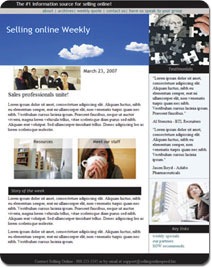
LetterPOP is one of those cool services using which one can create eye-popping newsletters, actionable presentations, irresistible invitations, beautiful product features, sizzling event summaries, informative club updates, lovely picture collages and much more. It provides beautifully designed template that are simple to use. You can just drag and drop the template of your choice and then add your own content and pictures. it allows you to easily edit the content quickly. You could seamlessly use your flickr account to insert pictures.

Recommended Reading:


LetterPoP LetterPoP2LetterPoP1

There are many more features that you would live to have. Sign in and try out LetterPOP

How To Download Entire Websites? Open Source Website Mirroring Tools

Sometimes, we need to download the entire websites (Website mirroring) for reference purposes. Sometimes, you may not have internet availability all the time and you may want to have an offline copy of the website that you love. There are software tools that are capable of grabbing the entire websites for you and keep a local copy (Website mirroring). They are highly configurable, you can specify the URL, sub domainsimage, wild characters to download etc. Here are some such Web Mirroring tools for your reference. However, these tools should not be used to steal off the information from Websites.

HTTrack

HTTrack is a free Open Source and easy-to-use Website mirroring utility. It allows you to download a Web site from the Internet to a local directory, building recursively all directories, getting HTML, images, and other files from the server to your computer. HTTrack arranges the original site’s relative link-structure. Simply open a page of the "mirrored" website in your browser, and you can browse the site from link to link, as if you were viewing it online. HTTrack can also update an existing mirrored site, and resume interrupted downloads. HTTrack is fully configurable, and has an integrated help system.

cURL

curl is a command line Website mirroring tool for transferring data with URL syntax, supporting FTP, FTPS, HTTP, HTTPS, SCP, SFTP etc protocols.

Wget

Wget is a free and Open Source software package for retrieving files using HTTP, HTTPS and FTP, the most widely-used Internet protocols. It is a non-interactive command line tool, so it may easily be called from scripts, cron jobs, terminals without X-Windows support, etc. Wget has many features to make retrieving large files or Website mirroring or FTP sites easy.

How to Broadcast Yourself easily using P2P Streaming?

While there are many ways to broadcast yourself, here is something promising for bandwidth conscious broadcasters who wants to distribute their live videos.

GoalBit is a open source P2P streaming, released by a group of Uruguay-based P2P researchers is a video streaming platform capable of distributing high-bandwidth live video content to everyone preserving its quality. With GoalBit, you can live broadcast yourself or you can play and record video streams on the network. It’s a free software released under the GNU General Public License.

goalbit

Live Broadcast Yourself is the main functionality which provides the user the capability of creating its own video stream. The user can control several aspects of such transmission, such as the content being transmitted, its quality and encoding, the publication method used and the capability of encrypting it. When this functionality is working the peer is referred to as a Goalbit Broadcaster peer, with every Goalbit Player working as a client being able to join the generated video stream.

GoalBit Player is available for Windows and Linux.

Here is the step by step procedure how to broadcast yourself.

Technorati Tags: ,,

del.icio.us Tags: ,,

Cloud Analytics – How To Track Your Spending On Expensive Cloud Computing Resource?

Cloud Computing or the internet based computing has give rise to so many new jargons such as Software As A Service (SaaS), Platform As A Service (PaaS) etc. Many startups/enterprises have been using Cloud resources such as Amazon EC3, Microsoft Azure etc. Since these Cloud Servers offer exceptional scalability, fault tolerance, pay as you go model, Cloud Computing has become a trend for the last few months/years. But, the reality is, there are few companies that really understand how all these work and if it really offers cost reduction in maintaining Cloud resources over traditional seimagerver technology. One of Mckinsey Report says that the Cloud Computing is really expensive and they cautioned us over its costs. So, it is really a debatable question whether the Cloud Computing really helps reduce the cost or just improves flexibilities etc. However, It also depends on how we use Cloud Resource and how we utilize the storage and bandwidth optimally.

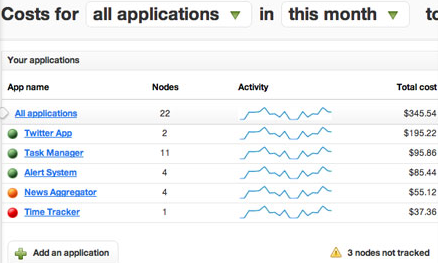
So, How do you really monitor your Cloud Spending? Is there a way so that you can monitor your Cloud Usage and Spending just like Google Analytics does for your web site? Fortunately there is now! CloudSplit can literally do that and give you a real-time dashboard for your Cloud Spending.

What can CloudSplit do for your business?

Real-time spending insight, real-time cost control.

  • Install CloudSplit’s cost counter. (It is Open Source Software that just monitors traffic)
  • View your costs by application in real-time. (It captures historical data as well as highlights big spenders)
  • Control costs with alerts and cut-off limits. (If costs are eating your profits, you will get notified)
  • Eliminate unnecessary spending on your Cloud. (Idle Servers, Unnecessary bandwidth etc cost money. Better catch them with the CloudSplit counter)

image

Online Backup Services to Backup Files From Your Computer Easily and Safely

By taking a backup of your important files, you protect these files against future data loss like data corruption, accidental deletion, hard drive failures etc. The biggest nightmare one can have is to see their hard disk crash and they have not backed up their files. Compared to earlier days, there are many online backup services that not only makes your job of backing up data easy but also provide a various advanced features like high level of data security by encryption, continuous backup, automatic backup without the need for physical medium like tapes and CDs etc. Here in this post we review online backup services where you can store your files easily and safely.

online-backup

Image Source: www.onlinebackupsreview.com

1. ADrive

ADrive leads the online data storage and backup industry by offering the largest amount of free storage and backup on the Internet. It also offer a suite of enhanced service features including increased storage capacity for premium users, and have extended its services to enterprise customers to help protect their business valuable data. ADrive offers complete and secure solutions to store, backup, share, access, and edit files from virtually anywhere, at any time. ADrive serves as an online, centralized vault for all important file types including: music, videos, photos, documents, and more. The basic plan that allows 50GB of storage is free for individual. There are hosts are features available under Signature and Premium plans. Check the plan that is suitable for you and try the 14 days trial here. The service is available for machines running Windows, Linux or Mac

2. Backblaze

Backblaze is one of the simplest way to backup your online data. Backblaze online backup encrypts and uploads all your data. When you need it, you an either restore from the web or get a DVD or USB drive sent via FedEx. It stores your data in a high security vault using military-grade security. It encrypts the files on your PC and then sends and stores the encrypted file in its secured datacenter. The backup service is available for machines running Windows or Mac. Check the features and the price here.

3. Carbonite

Carbonite provides an unlimited backup capacity of online backup that works completely automatically. The backup is secure and encrypted and it provides a easy way to recover files. It supports both Windows and Mac. Start a free trial here and checkout for yourself.

4. BackMii

BackMii is one of the safest online backup services available as it bakups up data in more than one location. BackMii stores three copies of your data (you only pay for 1 copy), on 3 servers, in 2 geographically remote locations. Most other providers store only one copy of a user’s data, or store the copy on a single RAID array. BackMii encrypts your data before it leaves your computer(s) and once it is stored on BackMii’s servers. BackMii offers an optional encryption key for users, so only you can see your data. The services is available for Windows. Check the detailed feature list and pricing here.

5. Altexa Online Backup

Altexa is specialized in offering data backup software by making use of the power and security that online data backup can offer. Its internet backup software allows you to back up your documents, in a safe, secure fashion, over the internet, to Altexa backup servers. If anything happens to your data locally or to your computer, you can be sure that a safe copy is only a few clicks away! Altexa Backup is one of the easy-to-use and the powerful off-site data backup solution available for machines running Microsoft Windows. You can checkout the features and free trial here.

Technorati Tags:
del.icio.us Tags:
Related Posts with Thumbnails