Tag Archive for free alternative

Sharing violation issues? How to find opened/locked files on Windows?

OpenedFilesView displays the list of all opened files on your system. It also shows a detailed additional information on handle value, read/write/delete access, file position, the process that opened the file, and a lot more on thos opened/locked files.

This utility is especially useful if you try to delete/move/open a file and you get one of the following error messages:

  • Cannot delete [filename]: There has been a sharing violation. The source or destination file may be in use.
  • Cannot delete [filename]: It is being used by another person or program. Close any programs that might be using the file and try again.
  • When you feel that a file is maliciously being used by a malware/spyware etc.

OpenedFilesView also lets you close those opened/locked files (except those opened by Windows kernel).
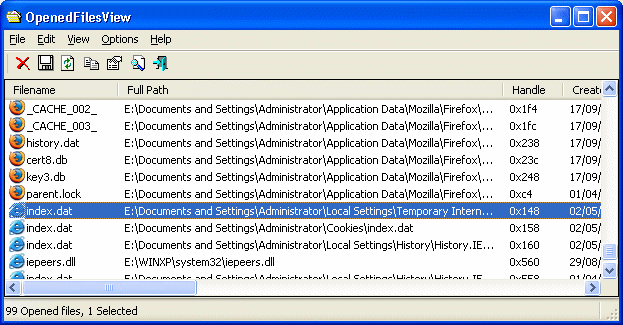
openedfilesview

You need to have Admin privileges in-order to run the tool. It mostly works on all newer versions of Windows (except Windows 95/Me/NT). OpenFilesView is a standalone executable, doesn’t need any supporting DLLs (that’s cool).

Well, How does it work?

As the Author puts it;

“OpenedFilesView uses the NtQuerySystemInformation API to enumerate all handles in the system. After filtering non-file handles, it uses a temporary device driver - NirSoftOpenedFilesDriver.sys for reading the information about each handle from the kernel memory. This device driver is automatically unloaded from the system when you exit from OpenedFilesView utility”


RSS Feed

Convert Your Phone Screen Into A Canvas

If you are a person who loves to sketch all the time then its time to get on to one of those Windows Mobile Devices and Get your hands on the Pencil Box.

sailing_ship

The Phone Box software for Windows Mobile is an extremely light and simple drawing tool that lets you to literally convert your mobile phone screen into a canvas. It provides only the necessary items like eight pencils, one eraser, a clear canvas and stimulates you with loads of imagination to draw.

fish

Tap a pencil you want to draw and the active pencil moves above the others, so you always can see what pencil is active. Tap eraser to activate it, move it left-right-up-down to erase stuff and tap a pencil to deactivate the eraser.

To clear canvas, tap the icon and you will be asked for confirmation. To exit, just tap the red button.

The only drawback is that is does not provide a “save” option. Pencil Box automatically saves the canvas to bitmap (BMP) file named “PencilBox.bmp” and is stored in “My Documents” folder on your Pocket PC. Whenever you need to access, make sure you copy or rename that file using use your favorite File Explorer.

Overall, Pencil Box is free and very simple to use. One can create really cool drawings.

apple orange nest

Download and give it a try!

To download this program direct to your phone, scan this QRcode barcode link

barcode

Don’t have barcode reader ? click here
QRcode generated by Tec-it

rssfeed

5 Nifty tools to repair and optimize registry

We had detailed posts on how to clean spywares and malwares from your PC. Here is another post on how to keep your registry clean and neat.

Why do you need Registry Cleaning software?

Registry Cleaners are designed to work on Windows operating Systems to detect any abnormalities in system registry and fix them safely. They quickly scan your system for unwanted or broken regsitry elements and report them via easy user interface. Based on the errors, they will either automatically clean them or ask your permission to do so. Sometimes there may be legitimate registry entries and are chances that they may be reported as broken. Luckily, all these software have Undo options. That is, they take automatic backup before deleting or cleaning registry entries and if you feel something is wrong after cleaning up the registry, you can always restore them. So, it is very important that you take backup before you do any tuning with the help of these tools.

Image Source - here

Do Registry Cleaners always optimize the registry? Are they really needed?

Answer is yes. Whenever we install applications, they add too many registry entries and when we uninstall them not all of them are deleted. They keep hanging and slows down your PC performance. Even malwares are capable of leveling behind broken or suspicious registry elements. It is recommended that you run these tools once in a while. As an additional resource, you could check mark’s blog. Mark Russinovich is a noted windows veteran.

Here is a list of 5 free registry cleaners

CCleaner

image

CCleaner is one of the best tiny security tool for Windows. It has significantly gained popularity in recent times and supported features are many. CCleaner is capable of cleaning unwanted files from Windows making it run faster, it can clean corrupt registry elements and optimize, clean internet browser history information and many more. It is safe to use, it automatically backs up data incase you want something to be restored.

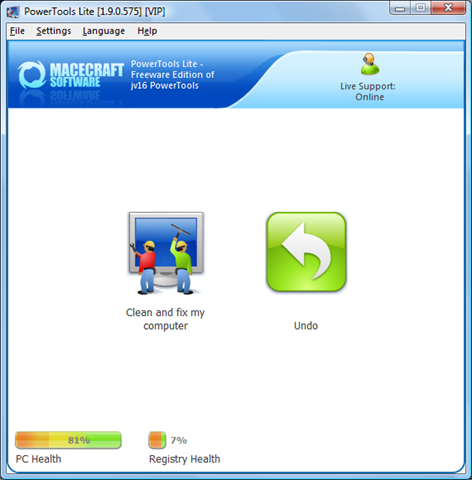
Powertools lite

Powertools lite

Powertools Lite is a registry cleaner and optimizer. It can detect broken registry entries, un-used registry elements and clean them. It can even clean file history and MRU details. Safe to use, automatic backup option and multilingual interface are a plus point.

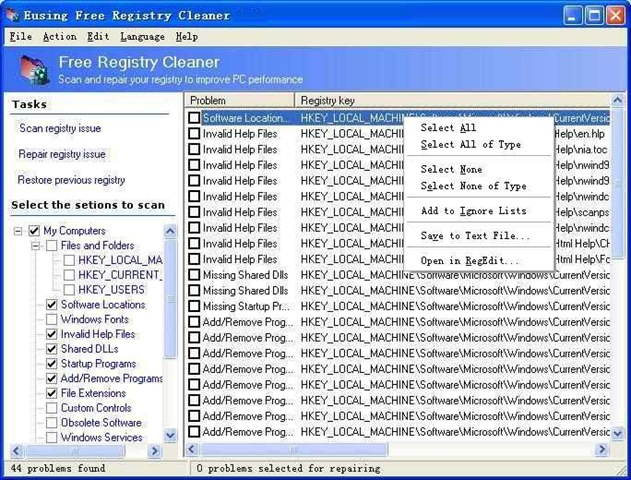
Eusing Free Registry Cleaner

eusing registry cleaner 

Eusing registry can optimize your windows registry by deleting or cleaning unwanted registry elements and for safety reasons, it automatically backups registry data as well. Pretty good and a popular tool for windows.

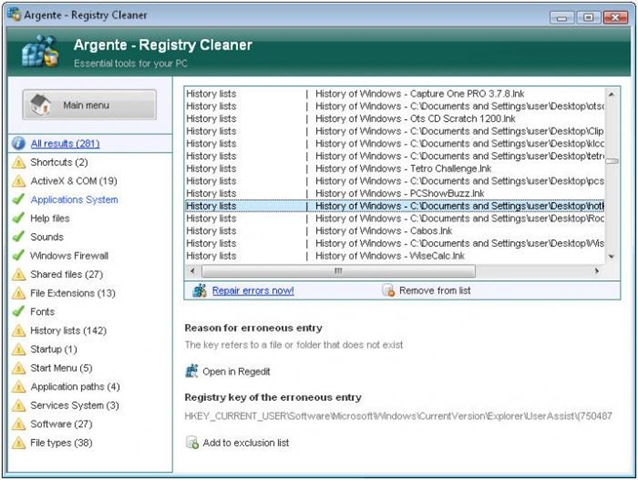
Argente Registry Cleaner

Argente registry cleaner

Argente Registry Cleaner has all the features that you would look for in an easy registry cleaner. You cans elect which area to scan, automatic backup/restore and many more features.

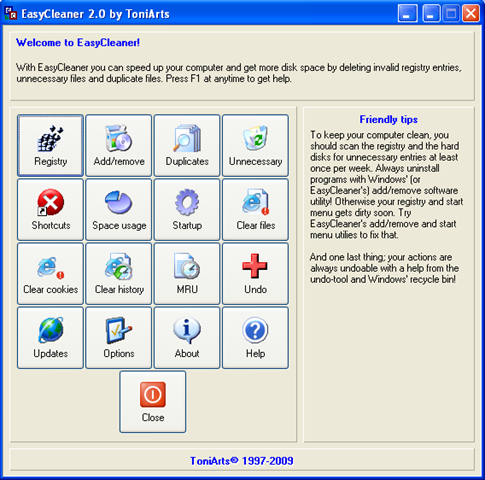
Easy cleaner

image

Easy cleaner has lots of tiny utilities for optimizing your registry, clearing cookies, MRUs, tuning StartUp processes, DiskUsage pie chart and many more. It has Undo option if you feel something went wrong while deleting.

RSS Feed

3CX – Software based PBX for Windows

Are you a startup that is trying to save money? or just a corporate entity trying to save cost? Then you should try looking at 3CX, a free software based PBX (telephone system) that works so well that the proprietary PBX like Cisco’s and Avaya’s may not be required at all. If you have installed proprietary PBX in your corporate network, you would know how expensive it is to maintain such PBX systems.

A while ago, we had reviewed telephony systems for SMB market and its trend in 2008. 3CX fits into SMB market well.

image

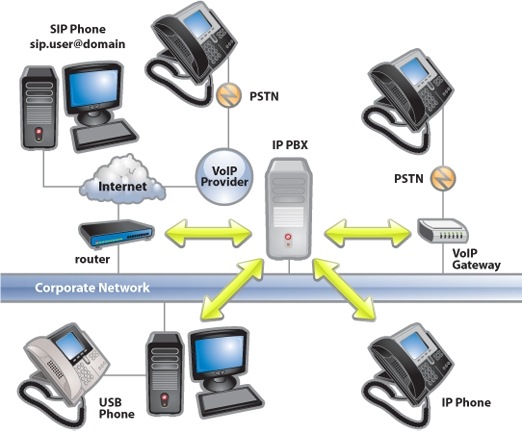
3CX VoIP Phone System for Windows is an IP PBX / SIP proxy that completely replaces a traditional proprietary phone system. Advantage is that it uses standard SIP software or hardware phones, supports VoIP services & traditional phone lines and offers numerous benefits over a traditional PBX. The commercial editions offer enterprise grade support as well as a number of business features.

3CX_ip-pbx-overview

3CX IP PBX – Overview – Courtesy – 3CX

A partial 3CX PBX feature list:

  • No need for separate phone wiring – phones use computer network
  • Easier to install & manage via web-based configuration interface
  • A software-based IP PBX is far less expensive than a hardware-based PBX / PABX
  • Employees can move offices without requiring any changes in the wiring or IP PBX configuration
  • Choose from the many SIP based hardware phones instead of getting locked in with one vendor
  • Receive & Make calls via the standard PSTN using VOIP Gateways
  • Save on call costs with ‘out of the box’ configurations for popular SIP / VOIP providers.

If you are looking for an integrated solution with unified alternative then checkout – Unison, The Unmatched Unified Alternative that replaces your old email server, IM server and PBX in one go!

RSS Feed

Free alternative to winzip

Are you looking for a free open source alternative archiver like WinZip, WinRAR? then read on…

Well, If you looking for a WinZip like archiving tool which is Free, reliable, robust with high compression ratio then you should definitely try either 7-Zip or jZip.

7-Zip has been around for some time now and has an increasing strong support base. It offers a ton features;

  • High compression ratio in new 7z format with LZMA compression
  • Supported formats:
    • Packing / unpacking: 7z, ZIP, GZIP, BZIP2 and TAR
    • Unpacking only: ARJ, CAB, CHM, CPIO, DEB, DMG, HFS, ISO, LZH, LZMA, MSI, NSIS, RAR, RPM, UDF, WIM, XAR and Z.
  • For ZIP and GZIP formats, 7-Zip provides a compression ratio that is 2-10 % better than the ratio provided by PKZip and WinZip
  • Strong AES-256 encryption in 7z and ZIP formats
  • Self-extracting capability for 7z format
  • Integration with Windows Shell
  • Powerful File Manager
  • Powerful command line version
  • Plugin for FAR Manager
  • Localizations for 74 languages

Well, 7-Zip is indeed worth trying and could also potentially be a default corporate archiving tool as it is reliable and more than that FREE. Corporates battered by the current economic turmoil, definitely will embrace such quality software at no cost.

jZip - A WinZip alternative

jZip - A WinZip alternative

An obvious downside of 7-Zip is that the GUI is not that intuitive and easy. A novice computer user may not be comfortable with its non intuitive interface. jZip exactly solves this short coming with a cool and easy GUI which is quite synonymous with WinZip archiver.

jZip is based on 7-Zip so, you get all the benefits of a proven archiving engine with an additional focus on intuitive GUI.

jZip is developed by Igor Pavlov and currently supports windows. But, the author claims that the Mac and Linux versions are in the pipe-line.

An excerpt from jZip.com

“jZip is about offering a robust compression and archiving application that’s easy to use. Something similar to WinZip, but totally FREE. We are currently working on the next jZip version that will offer additional features that will make it standout, not just as a free application, but also as the best one around.”

Highly recommended archiver for anybody - for home users, SMB and even bigger corporates. It could really kill softwares like WinZip, WinRar someday.

If you have any comments, please use the comments section below and let us know your voice or suggestions.

via jZip, 7-Zip

Related Posts with Thumbnails