Tag Archive for free office

Your software – Anywhere!

PortableApps.com Suit provides a complete set of free computer programs (including Web Browser :-), Office Suit, Calendar etc )that you can carry around on a portable device and use on any windows computer. It does not require any special hardware. Just the usual USB/Flash drives like MP3 players, iPods and things like that. When your USB device is plugged in, you have access to your favorite software and personal data just as would on your own PC!. That’s not it, when you unplug the device, your personal data stays in it. Perfect if you are using a public computer! No need to download the things you like again and again.

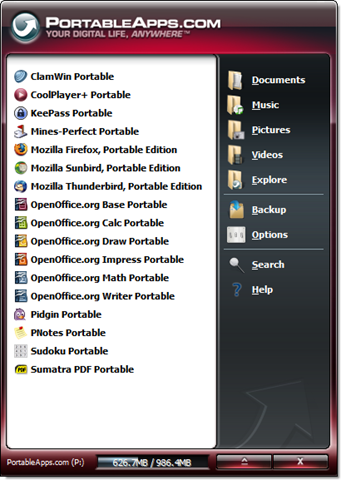
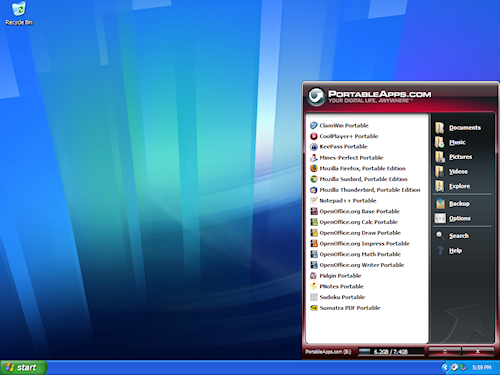
PortableApps.com Suit contains a Menu for easy navigation and you can see how neatly they fit in.

platform

PortableApps.com Suit contains the following Apps;

     - Writer (word processor)
     - Calc (spreadsheet)
     - Impress (presentations)
     - Base (database utility)
     - Draw (drawing)

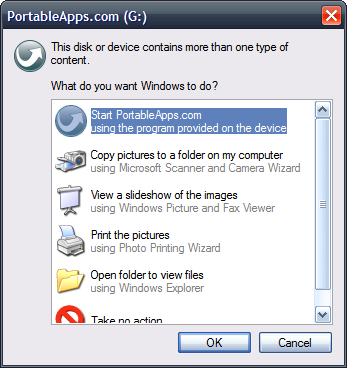
Extremely easy to use, when you plug-in, you get a Windows Popup something like this;

platform_autoplay

platform_on_xp_500x375

Head over to http://portableapps.com/suite for more information and start using it :-)

RSS Feed

Top Free Open Products for Personal Productivity

InfoWorld’s 2008 Bossies recognize the top free and open products for personal productivity apps:

Award

1. Sound editing - Audacity

Audacity is a free, easy-to-use audio editor and recorder for Windows, Mac OS X, GNU/Linux and other operating systems. You can use Audacity to:

  • - Record live audio.
  • - Convert tapes and records into digital recordings or CDs.
  • - Edit Ogg Vorbis, MP3, WAV or AIFF sound files.
  • - Cut, copy, splice or mix sounds together.
  • - Change the speed or pitch of a recording.
  • - For a complete list of features check the Audacity Feature List

audacity-macosx

2. 3-D modeling – Blender

Blender is the free open source 3D content creation suite, available for all major operating systems under the GNU General Public License. Its a 3-D modeling and rendering suite that runs on Windows, Linux, OS X, Irix, and FreeBSD — a breadth of platform support unmatched by commercial offerings.

For a complete list of features check the Blender Feature List

blender

3. Web Browser – Firefox

Firefox 3 sets the pace with dozens of new features, including the smart location bar, one-click bookmarking and blindingly fast performance. It provides some cool features like Password Manager, One Click Bookmarking and Smart Location Bar.

For a complete list of features check the Firefox Feature List

4. Image Editing - GIMP (GNU Image Manipulation Program)

GIMP is a freely distributed program for such tasks as photo retouching, image composition and image authoring.

It has many capabilities. It can be used as a simple paint program, an expert quality photo retouching program, an online batch processing system, a mass production image renderer, an image format converter, etc.

For a complete list of features and capabilities check the GIMP Feature List

GIMP

5. Productivity suite - OpenOffice.org

OpenOffice.org 3 is the leading open-source office software suite for word processing, spreadsheets, presentations, graphics, databases and more. It is available in many languages and works on all common computers. It stores all your data in an international open standard format and can also read and write files from other common office software packages. It can be downloaded and used completely free of charge for any purpose.

For more details on the features check Why OpenOffice.org

OpenOffice

6. PDF creation – PDFCreator

PDFCreator is a free tool to create PDF files from nearly any Windows application.Key features include creating PDF from any program that is able to print, creating encrypted PDF, creating PNG, JPG, TIFF etc.

For a complete list of features check the PDFCreator Feature List

PDFCreator2

Source:

Best of Open Source Software Awards 2008 InfoWorld’s 2008 Bossies recognize the top free and open products for business, IT, and personal productivity

Sharing online office space - ThinkFree vs Google Docs and Zoho

The space of online office has been shared by three major competitors - Google, ThinkFree and Zoho. ThinkFree stands out amongst it competitors by providing ability for web office users to work on the documents offline. Google Docs offers Gears, a software platform that is a browser extension to let you take your documents offline, work with Web applications while disconnected, and then sync the changes automatically when the user reconnect. ThinkFree customers have had this ability via its ThinkFree Manager since long.

ThinkFree Office’s sync tool, ThinkFree Manager, is available to all buyers of its desktop version of ThinkFree Office, so documents stored in a ThinkFree Web account can be worked available offline and automatically synced when you reconnect. ThinkFree provides My Office services which allow managing documents anytime from anywhere perfectly. One can manage their document from home, office ( ThinkFree office ) or manage from hotel, airport, library ( via online office ) or while moving using mobile office

As ThinkFree Office opens Microsoft Office documents and Microsoft Office opens ThinkFree documents, there are no obstructions to share documents with Microsoft Office users. As the UI of ThinkFree Office is similar to Microsoft Office, it masks it easy for Microsoft Office users to easily migrate to ThinkFree Office.
ThinkFree-Write Calc Show


ThinkFree offers two products: an online, web-based office suite and a Microsoft Office-compatible suite for the desktop. Users can synchronize data between the web service and their desktops via the SyncTool ThinkFree Manager.

A perfect document management system My Office provides the following:

1. 1 GB of free space

1 GB of free space is provided by My Office so you can store and access all of the documents in secure server of ThinkFree without the hassle of backing up, virus protection etc.

2. ThinkFree office for desktop

ThinkFree office for desktop is a suite of office software package that is compatible with Microsoft® Office. ThinkFree office runs popular formats like .doc, .docx, .xls, .ppt and .pptx.
The office suite software package includes
-
ThinkFree Write for word processing, an online word processor
-
ThinkFree Calc for spreadsheet
-
ThinkFree Show for presentation


ThinkFree interface is easy to learn unlike Microsoft Office but the look and feel is like Microsoft Office. It supports multiple operating systems like Windows, Mac and Linux.

3. ThinkFree online Office

ThinkFree documents can be saved directly on the online secure storage. ThinkFree supports multiple languages like English, Spanish, Italian, German, French, Chinese and Japanese.

4. Sync Tool

ThinkFree Manager ( Sync Tool ) handles updating the latest file information. You can keep making documents anytime anywhere and the File Sync handles updating the latest file information so you don’t have to spend uploading the latest changes you did while you were offline.

5. Powerful HTML editor

Web Word “Note” provides a powerful web editor for powerful blogging. Easy to edit as various templates and layouts are provided. You can create various mashup services ( yahoomap, youtube videos, flickr images

6. Sharing Documents

Sharing documents is very easy as you don’t need to email the document as an attachment. You can simply email the link to the file located on the ThinkFree server or synced folder on your desktop using any of your own email application. Its easy to choose who can access your document as an co-author or as an viewer. It provides an easy way to publish document to internet or your own web site or blog.

7. Mobile Access

ThinkFree is working on supporting a Mobile ThinkFree Office suite soon. Currently you can access the My Office service within your ThinkFree website using the mobile device.


Related Posts with Thumbnails