Tag Archive for FreeBSD

Open Source Gods That Showed The World The Power Of Community Development

We had earlier featured many open source software, but here is a list that is the God of all the open source software, the software that is matured, well-established, popularized open source development and the use of free open source products. These projects are serving as a foundation to many software development projects, business networks and the public Internet for years and showed the world the power of community development.

Community1

1. Linux Kernel

Though Linux was not the first open source software project, it was the one that proved the world how powerful community development on an Internet scale could be. Linux is a clone of the operating system Unix, written from scratch by Linus Torvalds with assistance from a loosely-knit team of hackers across the Net. It is a product of thousands of project contributors all over the world. The stable, reliable, and malleable Linux kernel is the foundation of an enormous variety of operating system distributions.

2. GNU Utilities and Compilers


Windows VPS starting at $17

Every developer on Linux would have definitely come across the mighty collection of GNU utilities. The GNU Project is a flag ship of the free software movement. The GNU tools and utilities when combined with the Linux kernel, provides a complete operating system. Linux kernel, the GNU utilities and the GNU Compiler Collection make up the holy trinity of the Linux world.

3. Ubuntu

The edge Windows had on Linux initially was the easy of use. However, Ubuntu over took with its principle of ease-of-use, making it the Linux distribution of choice for novice users and for sellers of PCs with Linux pre-installed. Derived from Debian GNU/Linux, it is a community developed, Linux-based operating system that is perfect for laptops, desktops and servers. It contains all the applications you need - a web browser, presentation, document and spreadsheet software, instant messaging and much more.

4. FreeBSD, NetBSD and OpenBSD

FreeBSD is famous for superior reliability and performance. NetBSD is famous for supporting a wide range of hardware platforms, including embedded systems and mobile devices. OpenBSD is advertised as possibly the most secure Unix-like operating system, with a security audit that never stops.

5. Samba

There is Linux/Unix and there are Windows. In-between there is the Sama. Samba bridges the gaps between Linux/Unix and Windows. It allows Linux and Unix servers to provide file and print services to Windows clients, and it allows Linux and Unix clients to work with Windows file servers.

6. MySQL

There is a huge active MySQL user community attest that has adopted MsSQL because of its easy of administration, excellent read performance, and transparent support for large text and binary objects. It had become the number one choice for many Web sites.

7. BIND

BIND (Berkeley Internet Name Domain) is the most popular DNS (Domain Name System) server since the dawn of the Internet. BIND is by far the most widely used DNS software on the Internet. It provides a robust and stable platform on top of which organizations can build distributed computing systems with the knowledge that those systems are fully compliant with published DNS standards.

8. Sendmail

Sendmail was born before the Internet was standardized. It served as the backbone of the Internet mail system throughout the 1980s and 1990s. It has lost ground to Postfix, Qmail, Exim, and Microsoft Exchange in recent years, but still it is among the most popular mail transfer agents.

9. OpenSSH and OpenSSL

Secure internet communication would not have been easy with tools such as rlogin and telnet, which send usernames and passwords in clear text. OpenSSH encrypts shell communications to remote computers, addressing the deficiency in tools such as rlogin and telnet. OpenSSL is a software library that allows developers to incorporate SSL or TLS into their Internet applications.

10. Apache

Half of the world’s Web sites run on Apache that puts the “A” in the LAMP. It its still fast, flexible and secure with broader operating system and web programming language support and many of modules available to extend the functionality. The application is available for a wide variety of operating systems, including Unix, GNU, FreeBSD, Linux, Solaris, Novell NetWare, Mac OS X, Microsoft Windows, OS/2, TPF, and eComStation

These are the best of open source software in the InfoWorld Bossies Hall Of Fame.

rssfeed3

Top 30+ Free Mind Mapping Tools - Best Mindmap

All about Mind Mapping and Freely available Mind Mapping tools.

What is Mind Mapping?

Quoting Wikipedia:

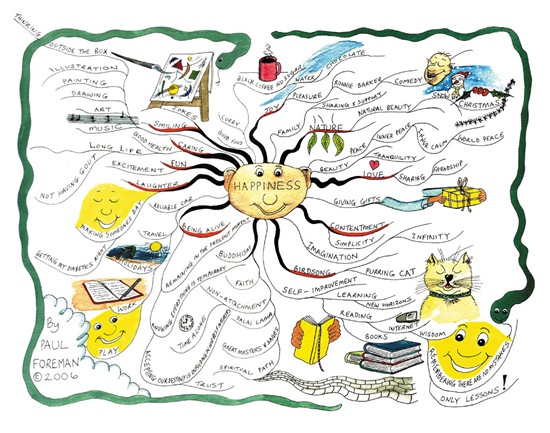
A mind map is a diagram used to represent words, ideas, tasks, or other items linked to and arranged radially around a central key word or idea. It is used to generate, visualize, structure, and classify ideas, and as an aid in study, organization, problem solving, decision making, and writing.

mm_happiness1

An illustration of a Mind Map on Happiness (Source: http://www.mind-mapping.co.uk)

Why Mind mapping is essential?

The elements of a mind map are arranged intuitively according to the flow of thoughts, and are classified into nodes, branches, or areas, with the goal of representing connections between portions of information. Advantages of Mind Maps are simplicity and the easy graphical representation enables easy understanding and memory retention. Mindmap

Mind maps are perfect for brain storming as it involves presentation of ideas in a radial, graphical, non-linear manner. Though the branches of a mind map represent hierarchical tree structures, their radial arrangement disrupts the prioritizing of concepts typically associated with hierarchies presented with more linear visual cues. This orientation towards brainstorming encourages users to enumerate and connect concepts without a tendency to begin within a particular conceptual framework. Mind Mapping tools can either be online or offline.

Top 10+ Free Mind Mapping tools

Here we list the best of free mind mapping tools. All of these are really great and worth trying.

  1. FreeMind - FreeMind is a premier open source, free mind-mapping software written in Java. The recent development has turned it into high productivity tool. Operation and navigation of FreeMind is faster than that of MindManager because of one-click ”fold / unfold” and ”follow link” operations. FreeMind is available for Linux, Mac and Windows. Here is a review of FreeMind.
  2. FreePlane - Freeplane is a great free and open source software to support thinking, sharing information and getting things done at work, in school and at home. It helps you with your mind map process.
  3. Edraw Mind Map - Edraw Mind Map is a vector-based freeware with rich examples and templates. Easy to create basic flow charts, mind map, brainstorming diagram and sketch map. Edraw Mind Map is available for Windows.
  4. Blumind - Blumind is a lightweight and powerful mind mapping tool, and it is free.
  5. XMind - XMind, is an open source brainstorming and mind mapping software tool developed by XMind Ltd. It helps people to capture ideas, organize to various charts, and share them for collaboration. Supporting mind maps, fishbone diagrams, tree diagrams, org-charts, logic charts, and even spreadsheets. Often used for knowledge management, meeting minutes, task management, and GTD. XMind is compatible with FreeMind. The latest version is XMind 3. Xmind is available for Linux, Mac and Windows.
  6. Bubbl.us - Create colorful mind maps online, Share and work with friends, Embed your mind map in your blog or website, Email and print your mind map
    Save your mind map as an image. Available on all OS/Platforms via browser.
  7. Bookvar – Bookvar is an extremely easy and funny to use mind mapping tool. Creating mind maps with Bookvar is as easy and funny as playing computer games. You can build your mind maps in a matter of seconds by using handy keyboard shortcuts. You can drag files from your computer and drop them in the mind map. Stunning User Experience, Richer user interface built on top of Windows Presentation Foundation - Microsoft’s next generation UI framework. Slick, user-friendly interface based on the Office Fluent Ribbon. Cool 3D animation effects. Create mind maps together with your friends and colleagues. All you need is connection between computers. Each user receives a unique color which identifies topics created by him. Share thoughts and ideas using the integrated chat support. Add images directly in your topics. Embed and play movies. Attach other resources to your topics as files. Bookvar is available for Windows only.
  8. Ekpenso - Create and share mind maps online, Make mind maps public or share them with groups or make them public, Export maps to XML, PDF, image or Freemind-files, Use ekpenso offline; Edit mind maps offline via Gears or Adobe AIR. Available on all OS/Platforms via browser.
  9. Mind42 - Keep track of all your ideas, whether alone, with colleagues and friends or working together with the whole world. Mind42.com is a browser based online mind mapping application. With Mind42.com installing mind mapping tools is no longer needed - for a hassle-free mind mapping experience. Just open the browser and launch the application when needed. Available on all OS/Platforms via browser.
  10. WiseMapping – Create powerful mind maps using the browser as you would with your desktop application. No installation is needed. publish, Share your mind maps and work with friends easily. Available on all OS/Platforms via browser.
  11. Docear - Docear is free and open source, based on Freeplane
  12. Calligra - Braindump is a tool to dump and organize the content of your brain (ideas, drawings, images, texts…) to your computer.
  13. DabbleBoard - Dabbleboard is an online collaboration application that’s centered around the whiteboard. With a new type of drawing interface that’s actually easy and fun to use, Dabbleboard gets out of your way and just lets you draw. Draw with flexible & smart tools. Reuse previously-made drawings. All as naturally as using a marker or a pencil. And now with chat and document sharing, web conferencing with Dabbleboard is easier than ever. Amazingly smooth freehand mind map tool which is worth trying. Available on all OS/Platforms via browser.
  14. MindRaider - MindRaider is personal notebook and outliner. It can also be used to create mind maps. It aims to connect the tradition of outline editors with emerging technologies. MindRaider mission is to help you in organization of your knowledge and associated web, local and realworld resources in a way that enables quick navigation, concise representation and infer referencing. Available on Windows, Linux and Java.
  15. ThinkGraph - ThinkGraph is a 2D Drawing application specialized for Mind Maps and Concept Maps authoring. ThinkGraph lets the diagram to have relations link, Hypertext Links etc. ThinkGraph is available for MS Windows (not available for Linux, Mac).
  16. GnuConcept - GnuConcept is a colaborative mind map tool for complex document creation. GnuConcept lets you draw the document concept map, edit all the concepts content and export it to several formats, like openoffice, xml or html.
    The GnuConcept Interfaz is divided in two frames: the drawarea frame, where you can draw the concept tree; and the textarea where you can write and edit the concept content. Available on Linux.

Other lesser known free Mind Mapping tools

There are lot many other free mind mapping tools available on the internet. here is a partial list;

  1. Semantik - Semantik (previously Kdissert) is a mind mapping-like tool to help students to produce complicated documents very quickly and efficiently : presentations, dissertations, thesis, reports. While targetted mostly at students, Kdissert can also help teachers, decision maker, engineers and businessmen. Semantik is available exclusively for Linux and other free operating systems.
  2. VUE - The Visual Understanding Environment (VUE) is an Open Source project based at Tufts University. The VUE project is focused on creating flexible tools for managing and integrating digital resources in support of teaching, learning and research. VUE provides a flexible visual environment for structuring, presenting, and sharing digital information. VUE is available on Linux, Mac and Windows.
  3. DrawAnywhere - Draw Flowcharts, Process diagrams, Organizational charts online and more. Login from anywhere and modify your diagram. Share your diagram with others or link to your webpage. Export your diagram as an image file (jpg, png etc). No software to download. You just need a web browser with Flash player.
  4. VYM – VYM (View Your Mind) is a tool to generate and manipulate maps which show your thoughts. Such maps can help you to improve your creativity and effectivity. You can use them for time management, to organize tasks, to get an overview over complex contexts. Available on FreeBSD, Linux, OS X.
  5. ThoughtEx.Net - Simple software to capture ideas for Windows Vista and XP
  6. Mapul - Mapul is a single web based project allows you to create completely organic looking mind maps. It is based on Microsoft silverlight technology on web.
  7. Text2Mindmap - Text 2 Mind Map is a web application that creates a mind map out of a list of words.
  8. MindNode – MindNode lets you create easy mind map and is exclusively for Mac user. It was created with the user in mind and features a very simple and intuitive user interface that lets the user focus on expressing and developing ideas. Nearly no time is required to learn the interface.
  9. HyperGraph - HyperGraph is an open source project which provides java code to work with hyperbolic geometry and especially with hyperbolic trees. It provides a very extensible api to visualize hyperbolic geometry, to handle graphs and to layout hyperbolic trees.
  10. Chartr – Chartr is another open source mind mapping tool for Linux clones with numerous features like mind maps with curved links, outline, box and color support.
  11. Morcego - Morcego is a 3D network browser written in Java and released under LGPL license. Helps to create 3d Mind maps. Morcego is developed by University of Sao Paulo, Brazil.

There are more than 300 (including commercial Mind Map tools) and all are listed in http://www.mind-mapping.org. It is a comprehensive master list of mind mapping tools and a great reference site.

RSS Feed

Related Posts with Thumbnails