Tag Archive for utilities

How to recover accidentally deleted files on Windows for free?


Have you accidentally deleted important document file or family picture or that old video of your? Are you regretting it? Well, don’t be sorry, there are very capable data recovery tools out there who could just bring that deleted file for you instantly! imageRecovering deleted files is just as easy as deleting the file :) There is a freeware utility called Recuva (pronounced as Recover!) and it does the data recovery possible. It is absolutely free but you could very well donate a couple of bucks if it really helps you.

Here is a step by step guide on how to locate the deleted file and recover it. Recuva is very intuitive as a software tool and here is the screenshots with explanation.

Step 1:

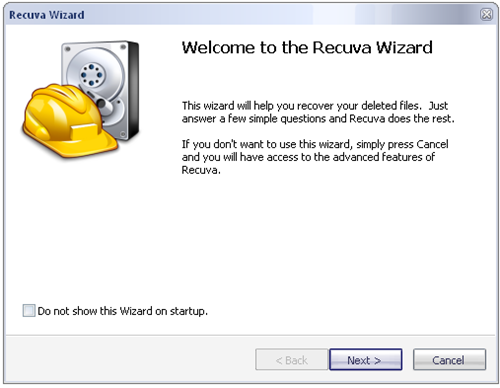
When you run the Recuva.exe, you get the following wizard. Click Next when you are ready.

 image

Step 2:

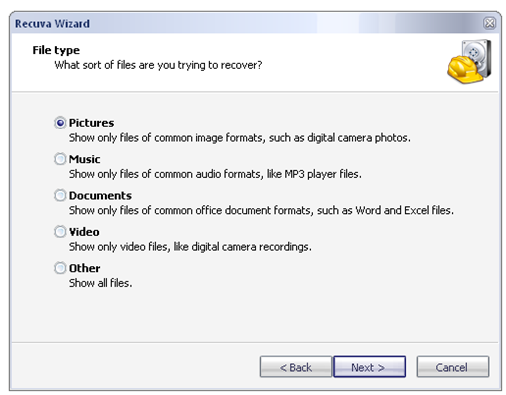
Decide what type of file are you trying to recover.

image

Step 3:

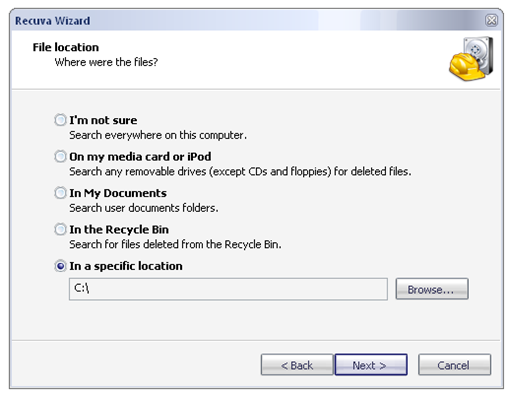
Select from where you want to recover the files from and hit next.

image

Step 4:

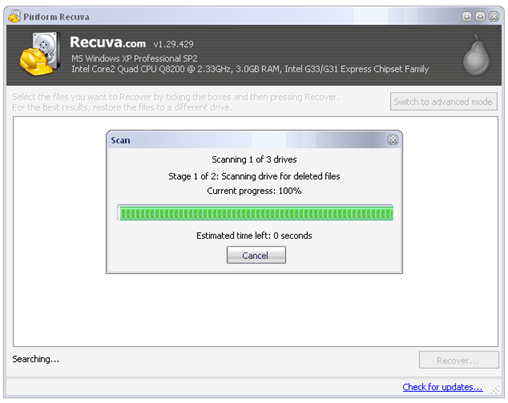
Recuva now scans through the files locating those dead ones and it shows a pretty accurate progress bar.

image

Step 5:

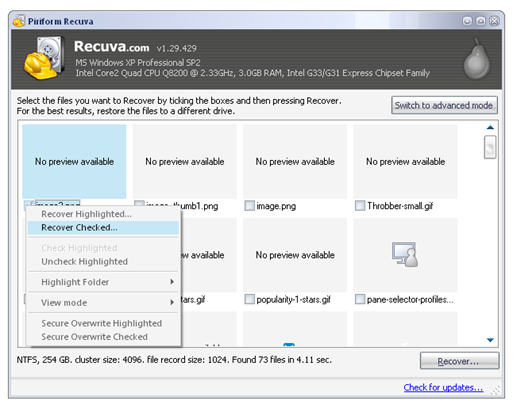
Select the file that you are looking for and click on Recover. Most of the time, Recuva finds the file that was deleted but if you deleted too many files or very large files frequently, then there could be a chance that Windows would have reused that space to store another deleted file and so on. In other words, old deleted files tend to get corrupted. That’s it, your deleted files should be back now! Isn’t that easy?

image

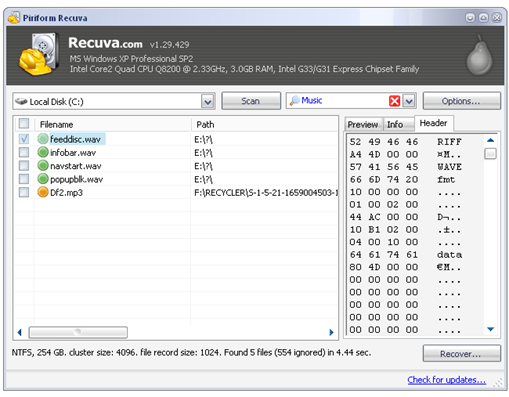
You could even read the file header information in the advanced option.

image

So, there is a very easy way to undelete or recover deleted files. So, what software do you use to undelete lost files? Do comment…

Download Recuva here.

RSS Feed

9 Free Data Backup and Recovery Utilities That Will Keep Your Important Data Safe

Data backup is very critical for every computer user whether it is for personal use or business, Hard Disk is likely to fail and important data collected over a period of time could be at risk. Especially Windows PC is more vulnerable to Virus attacks or Spyware attacks which could ruin everything and may call for fresh installation of Operating System. There are quite a few commercial and proprietary software that does Disk cloning, Partition backup, Automatic Data backup deployment to a network folder and more. Some notable commercial Data Backup software tools like Norton Ghost, Acronis True Image, Drive Snapshot etc do provide good features but many don’t know that there are equally good  or even better Data backup tools that are mostly free. Here is a list of 9 free data backup and recovery tools to protect your valuable data. In other words, these are free alternatives to Norton Ghost :)

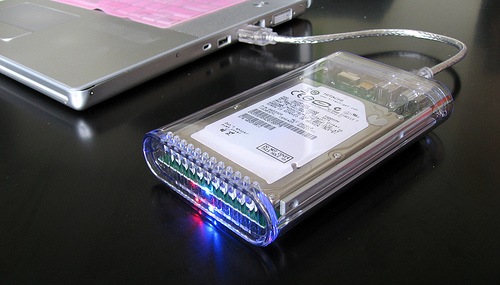
Hard Disk

Photo by miss karen

1. Clonezilla

clonezilla_logo_transparent

Clonezilla is free (GPL) disaster recovery, disk cloning and deployment software that is based on DRBL, Partition Image, ntfsclone, partclone, and udpcast. There are two Clonezilla variants, Clonezilla live is suitable for single machine backup and restore, While Clonezilla SE is for massive deployment, it can clone many (40 or more) computers simultaneously. Clonezilla saves and restores only used blocks in the hard disk. Supports a lot of features;

  • Filesystem supported: ext2, ext3, ext4, reiserfs, xfs, jfs of GNU/Linux, FAT, NTFS of MS Windows, and HFS+ of Mac OS. Therefore you can clone GNU/Linux, MS windows and Intel-based Mac OS, no matter it’s 32-bit (x86) or 64-bit (x86-64) OS. For these file systems, only used blocks in partition are saved and restored. For unsupported file system, sector-to-sector copy is done by dd in Clonezilla.
  • LVM2 (LVM version 1 is not) under GNU/Linux is supported.
  • Multicast is supported in Clonezilla SE, which is suitable for massively clone. You can also remotely use it to save or restore a bunch of computers if PXE and Wake-on-LAN are supported in your clients.

Download Clonezilla here

2. Macrium Reflect

image

Macrium Reflect is free Windows XP and Vista compatible disk imaging software with automatic scheduled backup etc. Great features are, automatic .iso backup of drives to DVDs, Network, USB etc really takes the pain of manual backup of OC Data. Of course, a lot more is supported:

  • Create a disk image whilst running Windows using Microsoft Volume Shadow copy Service (VSS).
  • Image to Network, USB, FireWire drives and DVD.
  • Built in scheduler.
  • 32 bit and native 64 bit versions.
  • Industry leading compression levels and speed.
  • Linux based Rescue CD with Network access and full GUI. Only 6.5MB in size!
  • Built in CD/DVD packet writing engine. Supports packet writing to DVD DL media with Windows Vista.
  • HTML log files.

Download Macrium Reflect here.

3. HDClone

image

The Free Edition of HDClone (for Windows) has limited features but sufficient for home users. It clones an entire hard disk to another, larger medium. You can use it for migrating an existing installation to a new hard disk or for rescuing data. The Free Edition is a real freeware without obligation to buy and is intended for the short-term usage at no cost. If you are frequent backup taker then higher end versions may be useful since they offer higher performance, support for a wider range of hardware, and additional options which are optimized for regular or professional use.

Download HDClone here.

4. XXClone

image

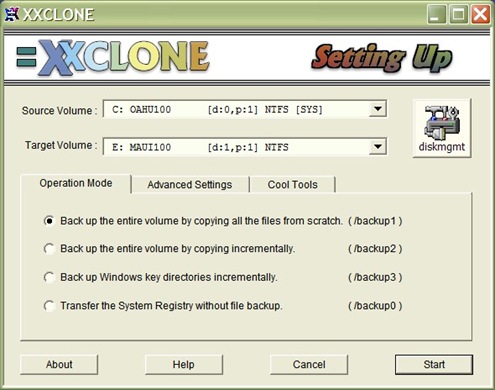
If you are not so tech savvy and prefer simpler ways to backup your drives, then XXClone Free (for personal use) is ideal. A really simple way of backing up data, as shown in the screenshot.

xxclone

XXClone supports following features:

  • Makes a self-bootable clone of Windows system disk.
  • Supports all 32-bit Windows (95, 98, ME, NT4, 2000, XP).
  • Can restore the self-bootability in many cases.
  • It takes only a minute to run.
  • Everyone should keep the Freeware handy for just in case.
  • The Pro version is ideal for daily backup.
  • Supports common internal disk drives (IDE, SATA, SCSI).
  • Supports external USB/FIREWIRE drives (good for a laptop).
  • Competes with Norton Ghost, DriveImage, MaxBlast.
  • Much faster than any of them in typical daily backup.
  • Need not go to the DOS mode. Operates in regular Windows environment.
  • Simple to use by novices.

Download XXClone here:

5. Carbon Copy Cloner

image

Carbon Copy Center, is a data backup solution for Mac, it has free version that you can use for personal use. It will save all your important data, family photos, documents and you can schedule it and forget!! It supports the following features:

  • Complete, bootable backups
  • Simple interface for indicating exactly what you want to back up
  • Restore using the same process used for backup
  • Backups are non-proprietary, so you can browse them or use them with Migration Assistant
  • Fast, incremental backups copy only the items that have changed since the last backup
  • Archival backup archives items that have been deleted from the source
  • Support for block-level disk-to-disk clones
  • Support for backing up across the network to another Macintosh
  • Back up to hard drives or to disk images
  • Schedule backup tasks on an hourly, daily, weekly, or monthly basis, or you can indicate that a backup task should run when the backup device is attached (e.g. an iPod). You don’t even need to be logged in for your backups to occur!
  • CCC recognizes iPods specifically, allowing time for the iPod:iTunes synchronization to complete
  • Built-in software update feature notifies you when updates are available

Download Carbon Copy Cloner here.

6. O&O software

image

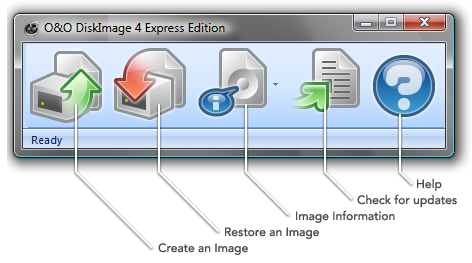
O&O Software Express Edition is a freeware (limited features) data imaging product. Advantage is, its being so easy to use, you’ll be able to create images of your entire computer and restore individual data drives in no time at all.

image

Features:

  • Mounts image as a drive – if, for example, you’ve accidentally deleted just one important file, you can now select to restore this file only from the entire image (Best feature!)
  • Images all drives, including drive information and system partition – all your installed programs and their personal settings can be imaged and quickly restored when needed
  • Restores individual data drives
  • Saves space with incremental and differential images that save only changes – images only those files that have been changed or added after the last imaging. This saves time!
  • Displays imaging information - O&O DiskImage 4 Express Edition keeps you constantly informed
  • Easy to use and free – free data imaging developed by data professionals

Download O&O Software Express Edition here.

7. PING (PartImage is not Ghost)

PING is a live Linux ISO, and It can be burnt on a CD and booted, or integrated into a PXE / RIS environment. PING can backup/restore partitions in an easy way. It is similar to Symantec Ghost, but has even better features, and is totally free.

Features include:

  • Probably the best available Linux toolbox for rescuing a system
  • Backup and Restore partitions or files locally or to the network (MS Network Shared directory, NFS, FTP or SSHFS)
  • Backup and Restore the BIOS data as well
  • Either burn a bootable CD / DVD, either integrate within a PXE / RIS environment
  • Possibility to Blank local admin’s passwor
  • Create your own restoration bootable DVD (see the Howto Documentation)
  • Partition and Format a disk before installing Windows (so to make sure your unattended Windows installation will happen on the right partition)

Download PING here.

8. EaseUs Disk Copy

EASEUS Disk Copy is a freeware providing sector-by-sector disk/partition clone regardless of your operating system, file systems and partition scheme by creating a bootable CD. The sector-by-sector method assures you a copy 100% identical to the original. Disk Copy can be used for copy, cloning, or upgrading your original small hard drive to a new larger drive. Simply speaking, it can copy anything from the old hard drive including the deleted, lost files and inaccessible data. So, the freeware is a perfect tool for Data Recovery Wizard to recover files from a backup disk.

Download EaseUs Disk Copy here.

9. Paragon Free Drive Backup

Paragon Drive Backup lets you back your drive/partition and restore when you need to recover from a loss of data. Simple and feature rich is good for personal use.

Download it here.

RSS Feed

Why Twitter chose bit.ly?

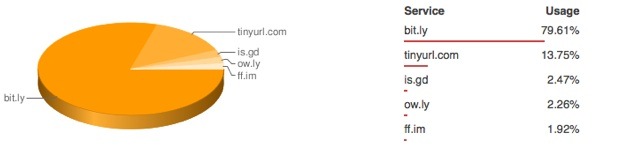
Our earlier article on TOP 5 URL shortening services needs a revisit :) A lot has changed after Twitter made bit.ly as their default URL shortening service. TinyURL seems to have lost a significant market share. There is developing story of market consolidation, tr.im service being shut-down, we expect many such services to say good-bye. Bit.ly is the market leader now after Twitter made it as official URL shortening service.

url-shorteners-chart

So, why did Twitter chose bit.ly? Why not TinyURL or others? Why there is a default URL shortening on Twitter at all? Why not users have their own preference? Well, What happens to URLs of discontinued services? tr.im promises that the shortened URLs would continue to live up-to Dec, 2009. But what happens after that? Is there a way to make those URLs live longer time? These are some of the questions need to be answered. In Official tr.im blog, a lot of responses are appearing and some of them are really thought provoking. Have a look at it here

RSS Feed

12 Free and Open Source ERP Business Software Solutions

Enterprise Resource Planning (ERP) is most crucial for a business and they really help business to streamline multisite environment with unified processes across locations. There are so many proprietary and commercial ERP solutions available like, SAP, Microsoft Dynamics, Oracle e-Business etc. But, very few know that there is a plethora of Free or Low Cost Open Source solutions that are extremely competent as well as with proper customer support just like the proprietary ones.  Here is a list of 12 such Open Source ERP/CRM solutions that are either cross platform or browser/web based so that the solutions run on any platforms. All of them have Free versions available without support and some of them offer paid support as optional. A survey at Compiere suggests that up to 60% of the ERP setup and maintenance cost can be avoided with its commercial versions.


ERP Solutions


Compiere

image

Compiere is a Comprehensive, Adaptable and Low Cost ERP (Java based) solution. Over 1.35 million downloads indicate the proven ERP package. Compiere has support for Cloud Infrastructure, Integration with Salesforce and much more. Automate all your business services functions, improve efficiency and customer satisfaction, easy quick customizations, high quality but with low cost ERP suit that will give other competitors a run.

There is a Free community version without support as well as Commercial editions that give you complete support and guarantee, training resources etc.

PostBooks

PostBooks-shiney_200x169

PostBooks is a full-featured, fully-integrated accounting, ERP, and CRM system, based on the award winning xTuple ERP Suite. Built with the open source PostgreSQL database, and the open source Qt framework for C++, it provides the ultimate in power and flexibility for a range of businesses and industries. Again, Free as well as Commercial editions are available and here is where to start knowing more about PostBooks.

Opentaps

image

Opentaps is a full-featured ERP and CRM suite which incorporates several open source projects, including Apache Geronimo, Tomcat, and OFBiz for the data model and transaction framework; Pentaho and JasperReports for business intelligence; Funambol for mobile device and Outlook integration; and the Opentaps applications which provide user-driven applications for CRM, accounting and finance, warehouse and manufacturing, and purchasing and supply chain management. Interestingly, it has Asterisk PBX integration which is described here.

Opentaps is used by a number of companies ranging from small business to Fortune500 companies.

Adempiere

AdempiereLogoNew

A Java based ERP-System which started as a fork of Compiere, supports a lot of features. A full fledged ERP, CRM and Supply chain management, Point of Sale suit.

WebERP

image

webERP is a complete web based accounting/ERP system that requires only a web-browser and pdf reader to use. It has a wide range of features suitable for many businesses particularly distributed businesses in wholesale and distribution. It is developed as an open-source application and is available as a free download to use. The feature set is continually expanding as new businesses and developers adopt it.
There have been in excess of 128,000 downloads to date

BlueERP

image

BlueERP is a double entry accounting application for small and medium business. Written in PHP, it is delivered through a LAMP environment to provide web access to your accounts.

Dolibarr

image

Dolibarr is an ERP/CRM for small and medium companies but also independent or foundations. Dolibarr success is probably due to the 3 simple rules applied on project since the beginning: Easy to install, Easy to use, Easy to develop. Supports lot of features like Supply chain management, proposal management, order management, payment management and much more.

ERP5

image

A full featured high end open source ERP designed for better business process, collaboration and leaner management.

jFire

image

jFire is a new, powerful and free ERP, CRM, eBusiness and SCM /SRM solution for business enterprises. JFire is entirely free/open-source software, uses the latest Java technologies (EJB 3, JDO 2, Eclipse RCP 3.3) and is designed to be highly customizable. It is a complete and extensible solution that fulfills all your business needs like user management, online trade with business partners, points of sale, various distribution channels forming a distribution network, store management etc.

OpenERP

image

OpenERP is open source ERP suit that supports Enterprise modules, Logistics, Accounting and Finance, HRM, CRM, Project Management, Business Process and more. It is complete package with commercial version available.

Apache OFBiz

image

The Apache Open For Business Project is an open source enterprise automation software project licensed under the Apache License Version 2.0. As per OFBiz, Open Source enterprise automation means: Open Source ERP, Open Source CRM, Open Source E-Business / E-Commerce, Open Source SCM, Open Source MRP, Open Source CMMS/EAM, and so on.

OpenBravo

image

OpenBravo is a web based ERP solution originally was based on Compeiere which is also Open Source. It supports standard ERP features like production information, inventory, customer information, order tracking, and workflow information.

RSS Feed

Top 8 free CD, DVD Burning Tools

CD/DVD Burning tools are essential and part of everyone’s life, whether it is burning music CDs or Photo Album or Movie Backups, they are always needed. There are many such commercial tools. Out of them Nero and Toast are very famous and successful ones. Also, there are many Free CD/DVD burning tools and can be good alternatives to Nero or Toast burning software. Here is a list of 8 such tools for various OS flavors ranging from UNIX to Windows to Mac OS!

Duplication

1. ImgBurn (Windows, Linux/UNIX)

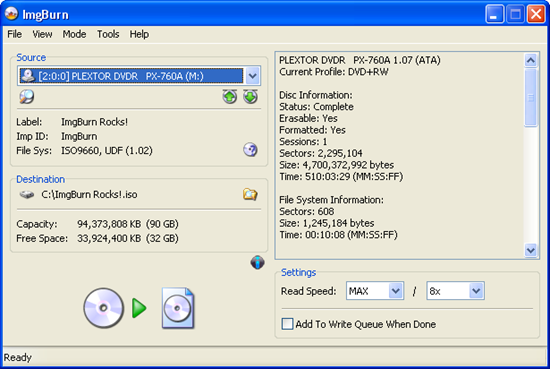
ImgBurn is a lightweight CD / DVD / HD DVD / Blu-Ray burning application that is very capable. It can burn Audio CD’s from any file type supported via DirectShow / ACM - including AAC, APE, FLAC, M4A, MP3, MP4, MPC, OGG, PCM, WAV, WMA and WV. You can use it to build DVD Video discs (from a VIDEO_TS folder), HD DVD Video discs (from a HVDVD_TS folder) and Blu-ray Video discs (from a BDAV / BDMV folder) with ease. ImgBurn supports all the Windows OS’s - Windows 95, 98, Me, NT4, 2000, XP, 2003, Vista, 2008 and 7 (including all the 64-bit versions). If you use Wine, it should also run on Linux and other x86-based Unixes.

screenshot_read

2. CDBurnerXP (Windows)

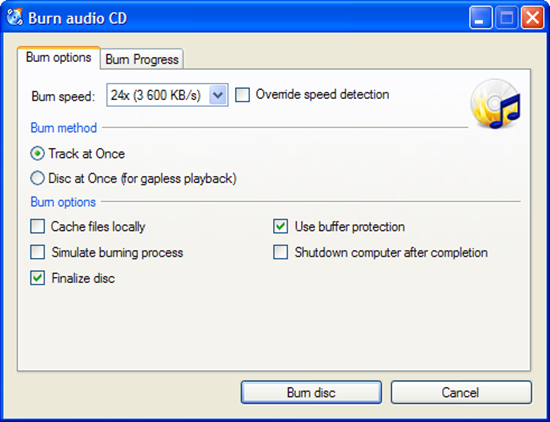
CDBurnerXP is a free application to burn CDs and DVDs, including Blu-Ray and HD-DVDs. It also includes the feature to burn and create ISOs, as well as a multilanguage interface. Everyone, even companies, can use it for free.

CDBurnerXP

3. InfraRecorder (Windows)

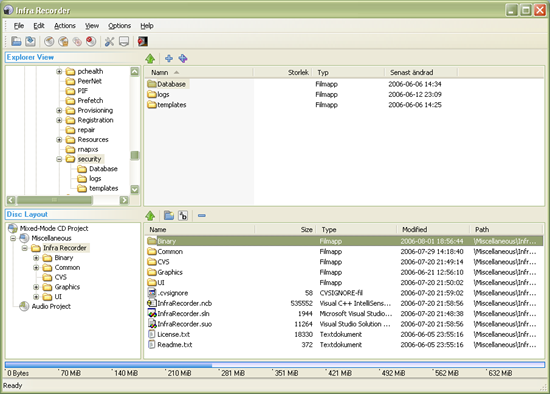
InfraRecorder is a free CD/DVD burning solution for Microsoft Windows. It offers a wide range of powerful features; all through an easy to use application interface and Windows Explorer integration. It supports, Dual layer DVD, various music files like Wav, MP3, OGG and more.

InfraRecorder

4. K3B (Linux)

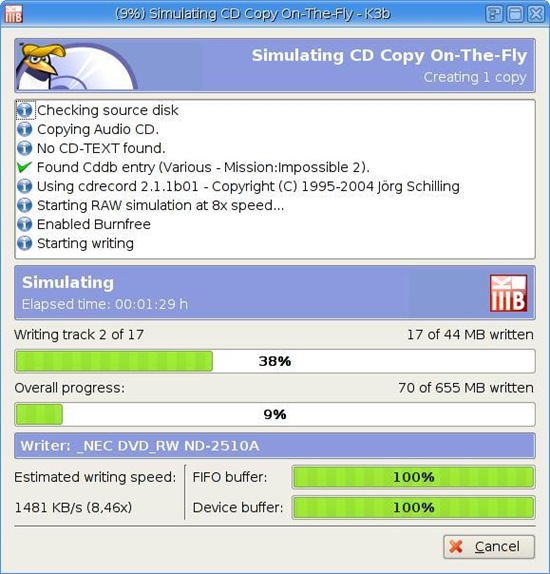
K3B is CD/DVD authoring software for KDE/Linux and great features. It can also do CD to CD/ DVD to DVD copy and more.

k3b

5. Brasero (Linux)

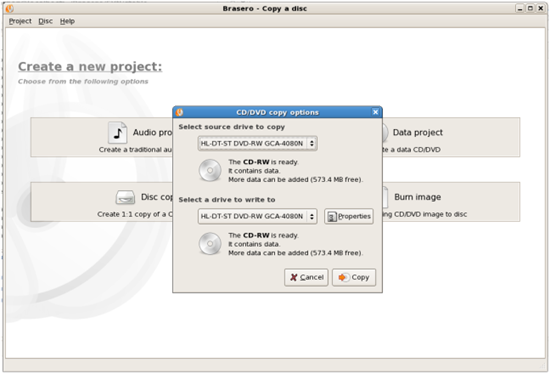
Brasero is a application to burn CD/DVD for the Gnome Desktop. It is designed to be as simple as possible and has some unique features like file filtering etc to enable users to create their discs easily and quickly.

Brasero

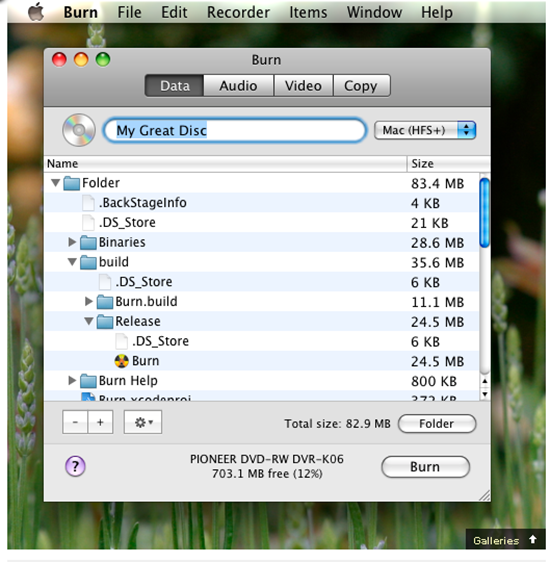
6. Burn (Mac OS)

Simple but advanced CD/DVD burning software for Mac OS.

image

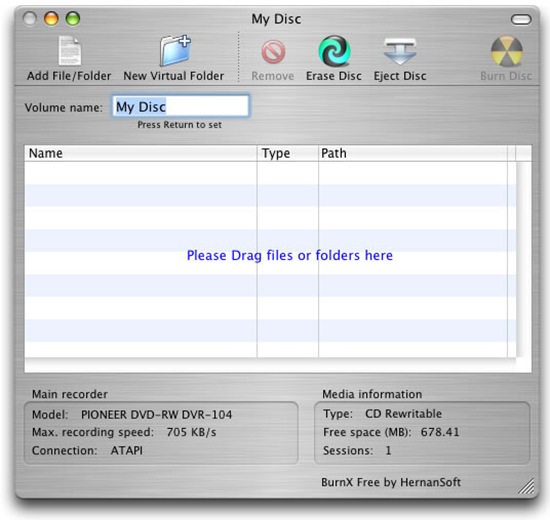
7. BurnX Free (Mac OS)

BurnX Free makes it very easy to burn CD’s with multiple sessions in an hybrid format for compatibility with other platforms. Available only for Mac OS X, this application lets you burn a CD or DVD by dragging and dropping files or folders to the main window, you can use sessions so multiple burns can be done in the same disc (CD only). It also has the ability to erase a CD or DVD.

BurnX 

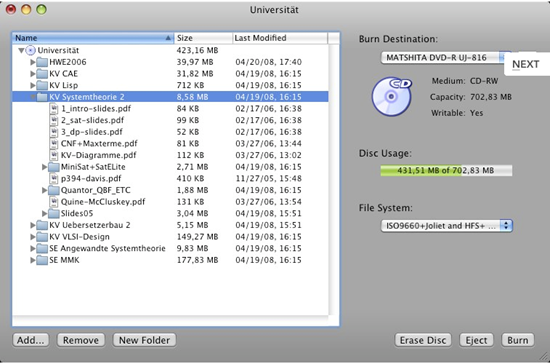
8. SimplyBurns (Mac OS)

SimplyBurns is a Mac OS X application with a GUI, which allows the user to burn CD / DVD media.

image

Do you know any better ones? Please have your comments and we will check them out!


RSS Feed

Related Posts with Thumbnails